
Today we are going to scrape the naukri.com jobs data. In this blog I expect you to have basic knowledge of scraping and setting up the python.
We will utilise the selenium web driver for chrome for this, you need to have chrome installed, you can use mozilla as well so feel free to do that.
Here is the requirements.txt file
selenium==4.15.2
webdriver-manager==4.0.1
BeautifulSoup4~=4.12.2
bs4==0.0.1Code language: Markdown (markdown)
run the pip install -r requirements.txt
Create a file called jobs.py or whatever you like doesn’t matter.
Add the following content.
from selenium import webdriver
from datetime import datetime
from selenium.webdriver.common.by import By
from selenium.webdriver.support.ui import WebDriverWait
from selenium.webdriver.support import expected_conditions as EC
from selenium.webdriver.common.keys import Keys
from selenium.common.exceptions import NoSuchElementException
from time import sleep
from random import randint

from selenium.webdriver.chrome.service import Service
from bs4 import BeautifulSoup
from webdriver_manager.chrome import ChromeDriverManager

options = webdriver.ChromeOptions()
options.headless = True
driver=webdriver.Chrome(service=Service(ChromeDriverManager().install()), options=options)Code language: Python (python)
These are the required dependencies we need to open the required website.
We are going to see machine learning jobs in india so if we go to naukri.com and see the url.

URL will be something like this
https://www.naukri.com/machine-learning-jobs-in-india?k=machine%20learning&l=india
Feel free to remove the query parameters so it’ll become like this
https://www.naukri.com/machine-learning-jobs-in-india
Also when you open next page it’ll be something like this
https://www.naukri.com/machine-learning-jobs-in-india-2
Which makes the pattern as
https://www.naukri.com/machine-learning-jobs-in-india-{page_num}
So, we will keep it simple and add a function to generate the url for us instead of writing more selenium code to scroll down and click the next button we’ll generate the url via function and extract data from it.
Here is the function
def generate_url(index):
    if index == 1:
        return "https://www.naukri.com/machine-learning-engineer-jobs-in-india"
    else:
        return format("https://www.naukri.com/machine-learning-engineer-jobs-in-india-{}".format(index))
    return urlCode language: Python (python)
Now we’ll write some simple code to loop through pages
Before that we need to see what class contains the jobs data wrapped, as naukri.com devs keep changing the class names so it might happen that if you read this blog later and it doesn’t work as it is so you need to update the class name to fetch the right class.
Just to give you idea what we are looking for is the class which wraps the jobs related data, like below if you do the inspect element.
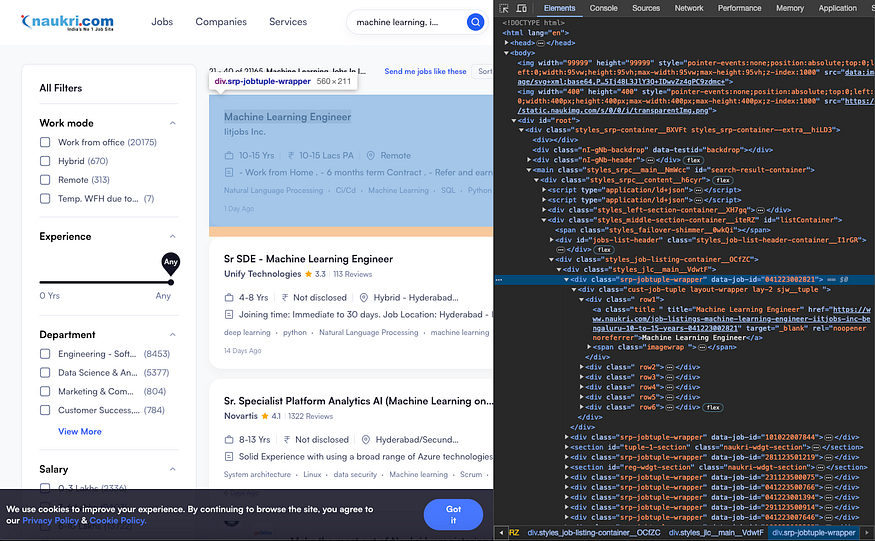
start_page = 1
# edit the page_end here
page_end = 400
for i in range(start_page, page_end):
    print(i)
    url = generate_url(i)
    driver.get(url)
    # sleep for 5-10 seconds randomly just to let it load
    sleep(randint(5, 10))
    get_url = driver.current_url
    if get_url == url:
        page_source = driver.page_source

    # Generate the soup
    soup = BeautifulSoup(page_source, 'html.parser')
    # This class name we need to fetch and put it here
    page_soup = soup.find_all("div", class_="srp-jobtuple-wrapper")
    parse_job_data_from_soup(page_soup)Code language: Python (python)
Now we just miss the logic to extract the job related data, let’s complete that function.
def parse_job_data_from_soup(page_jobs):
    print("********PAGE_JOBS***********")
    for job in page_jobs:
        job = BeautifulSoup(str(job), 'html.parser')
        row1 = job.find('div', class_="row1")
        row2 = job.find('div', class_="row2")
        row3 = job.find('div', class_="row3")
        row4 = job.find('div', class_="row4")
        row5 = job.find('div', class_="row5")
        row6 = job.find('div', class_="row6")
        print("*************START***************")
        job_title = row1.a.text
        # print(row2.prettify())
        company_name = row2.span.a.text
        rating_a = row2.span
        rating = extract_rating(rating_a)

        job_details = row3.find('div', class_="job-details")
        ex_wrap = job_details.find('span', class_="exp-wrap").span.span.text
        location = job_details.find('span', class_="loc-wrap ver-line").span.span.text

        min_requirements = row4.span.text

        all_tech_stack = []
        for tech_stack in row5.ul.find_all('li', class_="dot-gt tag-li "):
            tech_stack = tech_stack.text
            all_tech_stack.append(tech_stack)

        print("Job Title : {}" .format(job_title))
        print("Company Name : {}" .format(company_name))
        print("Rating : {}" .format(rating))
        print("Experience : {}" .format(ex_wrap))
        print("Location : {}" .format(location))
        print("Minimum Requirements : {}" .format(min_requirements))
        print("All Tech Stack : {}" .format(all_tech_stack))

        print("***************END***************")
    print("********PAGE_JOBS END***********")Code language: Python (python)
Now if you run the file via python jobs.py you will see the data in your terminal like this

You can update the code to save data into the csv file and also respect naukri.com to not bombard them with a lot of requests as this data is very precious. This blog is just to demonstrate that how selenium can be used.
Feel free to leave comments.
Here is the whole code.
from selenium import webdriver
from datetime import datetime
from selenium.webdriver.common.by import By
from selenium.webdriver.support.ui import WebDriverWait
from selenium.webdriver.support import expected_conditions as EC
from selenium.webdriver.common.keys import Keys
from selenium.common.exceptions import NoSuchElementException
from time import sleep
from random import randint

from selenium.webdriver.chrome.service import Service
from bs4 import BeautifulSoup
from webdriver_manager.chrome import ChromeDriverManager

website = """
#########################################
#           WEBSITE: naukri.com          #
#########################################
"""
print(website)
start_time = datetime.now()
print('Crawl starting time : {}' .format(start_time.time()))
print()

def generate_url(index):
    if index == 1:
        return "https://www.naukri.com/machine-learning-engineer-jobs-in-india"
    else:
        return format("https://www.naukri.com/machine-learning-engineer-jobs-in-india-{}".format(index))
    return url

def extract_rating(rating_a):
    if rating_a is None or rating_a.find('span', class_="main-2") is None:
        return "None"
    else:
        return rating_a.find('span', class_="main-2").text

def parse_job_data_from_soup(page_jobs):
    print("********PAGE_JOBS***********")
    for job in page_jobs:
        job = BeautifulSoup(str(job), 'html.parser')
        row1 = job.find('div', class_="row1")
        row2 = job.find('div', class_="row2")
        row3 = job.find('div', class_="row3")
        row4 = job.find('div', class_="row4")
        row5 = job.find('div', class_="row5")
        row6 = job.find('div', class_="row6")
        print("*************START***************")
        job_title = row1.a.text
        # print(row2.prettify())
        company_name = row2.span.a.text
        rating_a = row2.span
        rating = extract_rating(rating_a)

        job_details = row3.find('div', class_="job-details")
        ex_wrap = job_details.find('span', class_="exp-wrap").span.span.text
        location = job_details.find('span', class_="loc-wrap ver-line").span.span.text

        min_requirements = row4.span.text

        all_tech_stack = []
        for tech_stack in row5.ul.find_all('li', class_="dot-gt tag-li "):
            tech_stack = tech_stack.text
            all_tech_stack.append(tech_stack)

        print("Job Title : {}" .format(job_title))
        print("Company Name : {}" .format(company_name))
        print("Rating : {}" .format(rating))
        print("Experience : {}" .format(ex_wrap))
        print("Location : {}" .format(location))
        print("Minimum Requirements : {}" .format(min_requirements))
        print("All Tech Stack : {}" .format(all_tech_stack))

        print("***************END***************")
    print("********PAGE_JOBS END***********")


options = webdriver.ChromeOptions()
options.headless = True
driver=webdriver.Chrome(service=Service(ChromeDriverManager().install()), options=options)

start_page = 1
# edit the page_end here
page_end = 400
for i in range(start_page, page_end):
    print(i)
    url = generate_url(i)
    driver.get(url)
    # sleep for 5-10 seconds randomly just to let it load
    sleep(randint(5, 10))
    get_url = driver.current_url
    if get_url == url:
        page_source = driver.page_source

    # Generate the soup
    soup = BeautifulSoup(page_source, 'html.parser')
    page_soup = soup.find_all("div", class_="srp-jobtuple-wrapper")
    parse_job_data_from_soup(page_soup)Code language: Python (python)
If you found this article helpful, please consider buying a coffee 😝 https://buymeacoffee.com/y316nitka Thank you!